
Elgato - Stream Deck MK.2
ID: 16546
159
,90
13
,32
Delivery time:
1-3 business days

Discover our new Kick-Ass Systems
Streaming Accessories
159
,90
249
,90
1 - 3 of 3 Products
Elgato - Stream Deck MK.2
159
,90
13
,32
Delivery time:
1-3 business days
Elgato - Stream Deck XL
249
,90
10
,41
Delivery time:
1-3 business days
Elgato - Stream Deck+
249
,90
10
,41
Delivery time:
1-3 business days
High-quality streaming accessories are the foundation for professional and seamless livestreams—whether on Twitch, YouTube, or other platforms. In addition to standard equipment like microphones and cameras, what really matters are accessories that help streamline your workflow and make handling your setup easier.
These include, for example, Elgato’s Stream Decks, which have established themselves as control centers for your content. With them, you can control scenes, overlays, media, or lighting settings at the touch of a button. Multi-mount systems or flex arms offer even more control and organization—they allow for the perfect placement of your camera, lights, microphone, or smartphone, tailored to your specific space.
Thanks to modular components, you can flexibly expand your setup:
 Multi-mounts for stable mounting of lights, cameras, and more.
Flex Arms for flexible positioning of microphones or cameras
Accessories such as smartphone mounts, ball joints, or extension arms for custom setups
Especially during longer streaming sessions, ergonomics, a clear overview, and quick access to your tools are essential. With well-designed streaming accessories, you can structure your setup professionally—and focus entirely on your content. Discover the best products for higher quality, comfort, and creative freedom while streaming at MIFCOM now.
With the purchase of a Stream Deck from Elgato, you can unleash your full creativity. Stream Decks feature up to 32 LCD buttons, allowing you to perform any number of actions with just a single press. Whether switching scenes, adjusting audio settings, launching different media, or displaying on-screen text—it’s all incredibly easy with just a tap of a finger. Thanks to the Stream Deck’s compact design, you can easily place it right next to your keyboard and mouse.
Depending on your needs, there are various models to choose from:
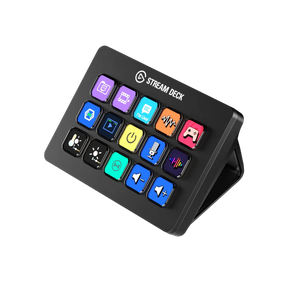
Elgato – Stream Deck MK.2: Compact model with 15 buttons and a customizable front panel
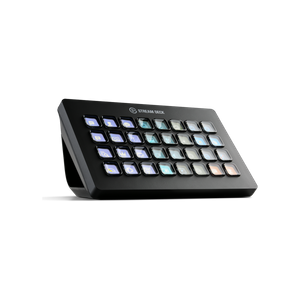
Elgato – Stream Deck XL: Large-format version with 32 buttons for maximum control
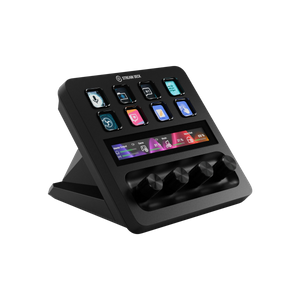
Elgato – Stream Deck+: Innovative model with buttons, knobs, and a touch bar for hybrid control
All models integrate seamlessly with popular streaming software and can be customized—perfect for streamers, content creators, and professional applications.
Simply plug the Stream Deck into your PC via USB and you’re ready to go. You can save as many actions as you like and assign them to the desired keys using Elgato’s software. If you’d also like to create your own icons for the actions, the Key Creator software will help you do that. Once you’ve finished configuring everything, you can get started and use the Stream Deck to set up everything you need exactly as you like.
In addition to capture cards and Stream Decks, there are many other ways to improve the quality of your stream:
Microphones: USB or XLR microphones offer clear, low-noise voice transmission and are ideal for high-quality streams.
Microphone arms and shock mounts: These mounts allow for flexible and vibration-free positioning of the microphone right on your desk.
Pop filters and windscreens: Reduce disruptive plosive sounds (e.g., “P” or “T”) and significantly improve speech intelligibility.
Webcams: Deliver high-quality Full HD or 4K recordings with sharp image quality.
Capture cards: Make traditional cameras stream-ready and enable latency-free transmission.
Green Screens: For virtual backgrounds or visual effects in your stream—space-saving and easy to set up.
Key lights and ring lights: Ensure even lighting without harsh shadows and significantly improve image quality.
Softboxes and light diffusers: For even softer light in larger streaming setups or video recordings.
Multi-Mounts and Flex Arms: Modular mounting systems for microphones, cameras, or lights—space-saving and customizable.
Stream Decks: Elgato Stream Deck MK.2, Stream Deck XL, and Stream Deck+ feature programmable LCD buttons for quick access to scene changes, sounds, lighting control, or apps.
Touchscreen controllers or macro keyboards: Additional input devices for advanced control during the livestream.
Software tools: Programs like OBS Studio, VoiceMeeter, or Elgato Control Center help with fine-tuning audio, video, and scene transitions.
Cable management: For a tidy and safe setup without cable clutter.
Tripods and table mounts: Ideal for flexible positioning of cameras, microphones, or light sources.
Acoustic optimization: Acoustic panels or foam absorbers improve room acoustics and prevent distracting echoes.