3 year warranty
Lifetime support
30-day return policy

Discover our new Kick-Ass Systems 

PCs for photo editing and creative workflows

background image

HIGH-END POWER
FOR DESIGNERS


High-end graphics workstations – fast performance for
demanding design and image editing tasks.
Checkmark.svg


Power for endless possibilities


Checkmark.svg


Optimized and customizable


Checkmark.svg


Smooth and seamless operation


Graphics workstations

1 - 4 of 4 Products
Hardware requirements for an image-editing PC:

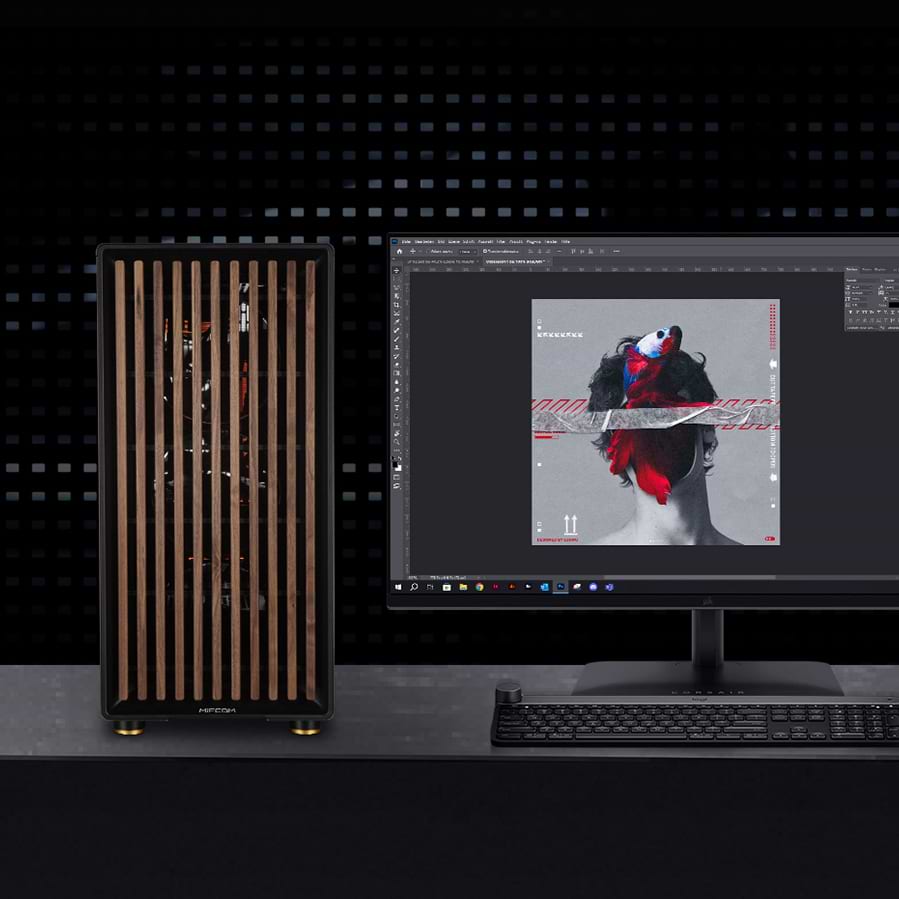
Are you looking for the perfect workstation for graphic designers or the perfect PC for photo editing? Then you’ve come to the right place with our PCs, which are specifically optimized for Adobe Photoshop and Adobe Lightroom. We’ve conducted our own tests and reviewed benchmarks and studies from the most reputable hardware magazines, and based on that, we offer you the best workstations for graphic designers:


Which processor is best suited for Adobe Photoshop and Lightroom?

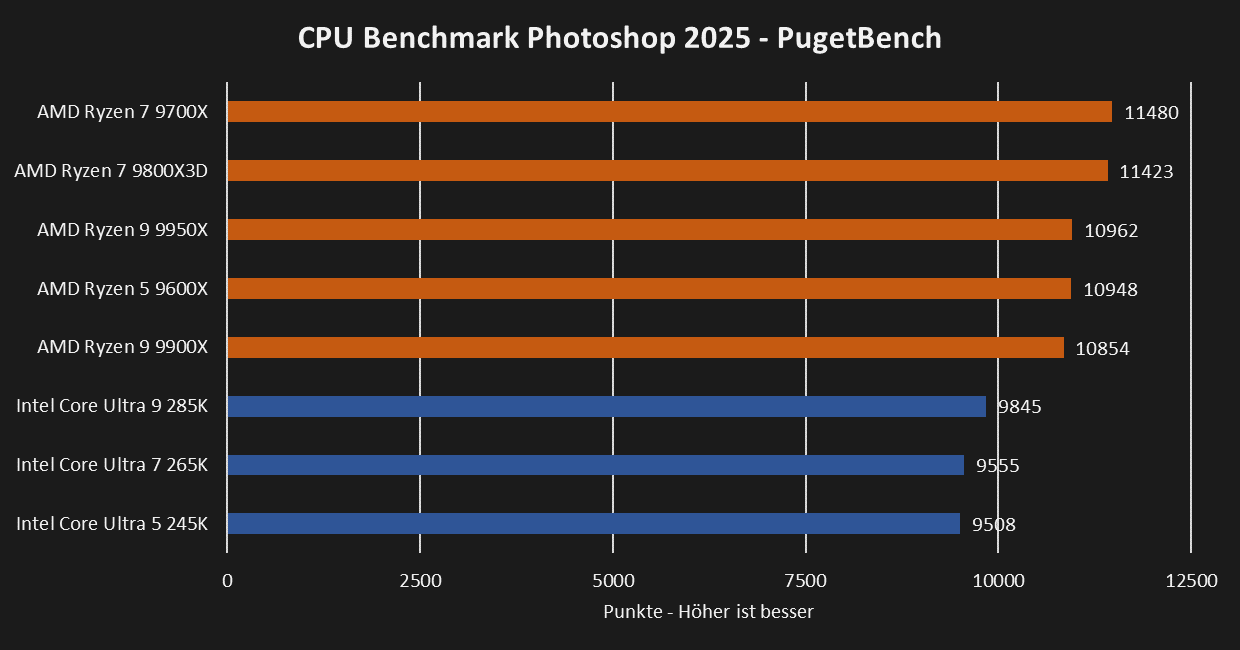
A computer’s performance for image editing depends largely on the workstation’s processor. However, it’s important to note that in most cases, Photoshop and Lightroom can only utilize a limited number of cores. This limit is approximately 8 cores. Therefore, it’s crucial to choose the right processor, as more expensive processors often don’t offer better performance. The Intel Core Ultra 7 265K and Core Ultra 9 285K processors, as well as AMD’s Ryzen 7 9700X, Ryzen 9 9900X, and 9950X, are optimal for these applications.


grafik.png


Which graphics card should you choose for a PC used for image editing?

Adobe Photoshop and Lightroom benefit most from a mid-range graphics card, such as the NVIDIA GeForce RTX 5060 or the NVIDIA GeForce RTX 5060 Ti. When selecting a graphics card for professional image editing, especially for Photoshop, you should ensure that it is supported by Adobe. If you’re working with a particularly large number of layers and graphically demanding effects, we recommend a graphics card with a large amount of VRAM, such as the NVIDIA GeForce RTX 5070 Ti.


How much RAM do you need for an Adobe Photoshop PC and Lightroom PC?

For an Adobe Photoshop PC, the amount of RAM depends on the document size. For documents up to 500MB, we recommend 16GB of RAM; for documents between 500MB and 1GB, 32GB of RAM; and for even larger files, 64GB.


For a Lightroom PC, the amount of RAM depends on the size and number of images to be edited. In most cases, 32GB of RAM is sufficient for Lightroom applications. If you’re editing particularly large images (750MB or larger), up to 64GB of RAM may be required.


Do I need an SSD for an image editing workstation?

Generally, there are three storage solutions to consider for PCs used by graphic designers: SSDs, NVMe drives, and mechanical hard drives. While mechanical hard drives are slow, they typically offer more storage space at lower prices than fast SSDs or NVMe drives. However, due to their slow speed, they are less suitable as system or swap drives.


SSDs are many times faster than HDDs, but also significantly more expensive. These drives are ideal as system drives and swap drives. Programs and projects stored on the SSD can also be opened much faster than on a traditional HDD.


NVMe drives are up to 5 times faster than SSDs, but they also cost significantly more. In most cases, an NVMe drive will not noticeably increase system speed, since even with standard SSDs, system performance is no longer limited by the drive’s speed. Like SSDs, these drives are well-suited as system and swap drives.


For a PC used for image editing, a primary system drive (SSD/NVMe) is recommended, on which the operating system and necessary applications are installed. With an SSD, the operating system and applications can be loaded noticeably faster than with a traditional HDD.


For storing projects and images, a secondary data drive (HDD/SSD/NVMe) is recommended. For most users, a mechanical hard drive is sufficient here. A second SSD can further speed up the loading of images and projects.


Especially for Photoshop, a tertiary swap drive (SSD/NVMe) can be useful if your workload requires a lot of temporary cache. In most cases, however, the primary system drive is sufficient for swap files.


If you prefer to configure your own workstation using our workstation configurator, or simply want to browse through all our recommendations to buy a workstation, that’s certainly possible too. If you’re looking for a rendering PC or a 3D workstation to complete large projects, you’ll find them in the corresponding categories. If you’re running programs that require a supported Quadro RTX GPU, you should opt for a Quadro RTX workstation.


Are gaming PCs also ideal for image editing and rendering?

In general, a gaming PC is also well-suited for image editing and video editing. With the introduction of 10-bit support for gaming graphics cards starting with the GeForce 10 series, there’s no longer any reason to buy a Quadro graphics card for a workstation intended for graphic designers. These are only worthwhile if you want to design more complex CAD projects or 3D models. Otherwise, gaming hardware—and graphics cards in particular—are also suitable for image editing.


Why a PC instead of a MacBook for graphic designers?

For a long time, Apple products were the standard hardware for graphic design, as graphic design software was developed exclusively for them. Today, most software is available for Windows and iOS, so there is no longer any reason to consider Mac systems the standard option for graphic designers.


Unlike Macs, Windows computers are significantly more affordable and can be customized and configured to your needs. Not only are the initial costs lower, but components on a Windows system can be replaced over the computer’s lifespan, whereas a Mac would require a complete replacement. Support for various peripherals is also now better on Windows workstations for graphic designers. So if you like to work with a keyboard and drawing tablet or other accessories, you’re better off with a Windows system.


Workstation for image editing Recommended price 2026:

Between €1,500 and €1,800

If your budget is between €1,500 and €1,800, we recommend an all-around PC for image editing. Here, we recommend entry-level models featuring AMD Ryzen or Intel Core 14th Gen processors. We also recommend an entry-level graphics card, such as an RTX 4060, as it delivers significantly more performance for GPU-accelerated effects. SSD storage is also used to quickly save and load projects.


Over €2,000

For anyone looking to purchase a high-end system for image editing, we recommend upgrading to processors with the best single-core performance, such as an Intel Core i7-14700K. It may also be worthwhile to install more RAM and expand the SSD storage for larger projects.


Accessories: The best monitors for image editing?

Which monitor is best suited for image editing? Which monitor best complements your PC for photo editing? A variety of factors, such as resolution, color gamut coverage, color depth, etc., play a role here. For monitors with a 27-inch screen diagonal, a resolution of 2,560 × 1,440 (WQHD) should be the minimum. For 28-inch and larger monitors, a resolution of 3,840 × 2,160 (UHD/4K) is recommended to achieve high pixel density.


In addition to the monitor’s resolution, color gamut coverage and color depth are important factors. These are crucial if you want to achieve the most realistic color representation possible with a high level of detail. The two most important color spaces are the sRGB color space and the Adobe RGB color space. The Adobe RGB color space is significantly larger than the sRGB color space. This is particularly important for photographers when they have their images printed. The larger color space makes the printed image appear even more lifelike. Most devices (displays, monitors, projectors, etc.) use the sRGB color standard, which minimizes color differences when viewing on different devices—a major advantage of this color space.


In today’s monitor market, the three panel types—IPS, VA, and TN—still dominate. New technologies like OLED, Micro-LED, etc., are only slowly making their way to the market. For image editing, the IPS panel is most recommended, as it offers the best color reproduction. Another major advantage for this application is the extremely high viewing angle stability. This means that no matter from which position you view the image, it remains the same. For these reasons, most workstation monitors also feature an IPS panel. Monitors specifically designed for image editing also come with factory color calibration and offer additional features such as an anti-glare hood.


Our recommendations:


Adobe Photoshop / Lightroom

 ProcessorGraphics CardRAM
Image editingAMD Ryzen 7 9700X
Intel Core Ultra 7 265K
NVIDIA RTX 506032GB
Professional image editingAMD Ryzen 9 9900X
Intel Core Ultra 9 285K
NVIDIA RTX 507064GB