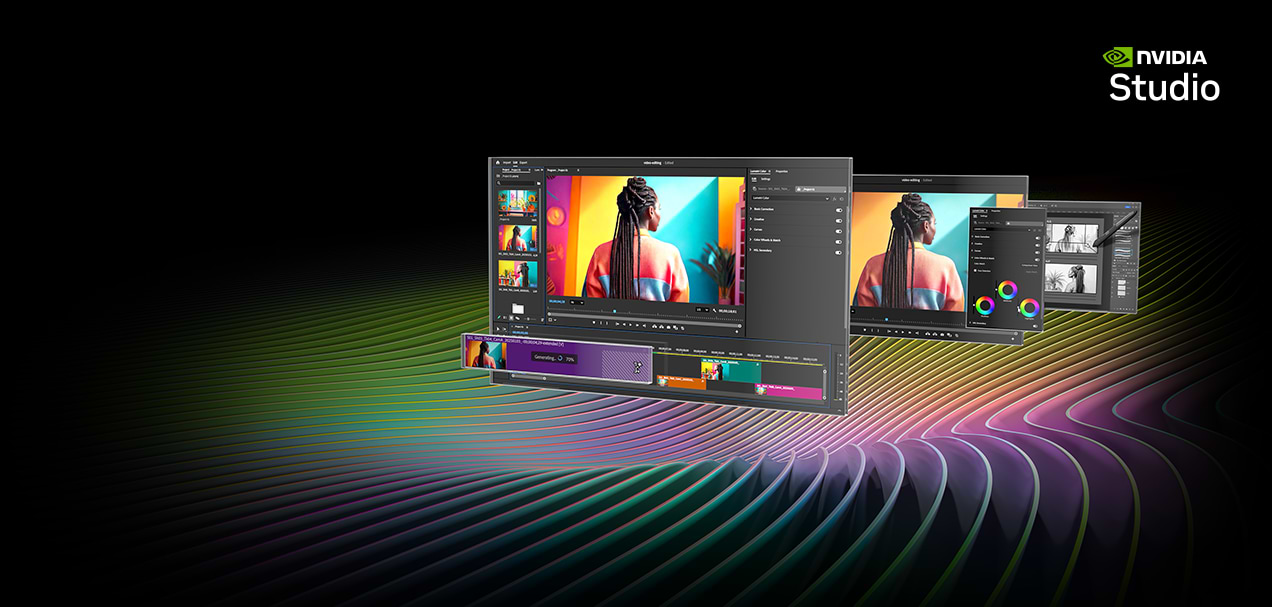
NVIDIA Studio delivers transformative performance at breakthrough speeds for video editing, 3D rendering, and design. Accelerate your most demanding workflows with exclusive RTX™ and AI-powered tools. Studio drivers provide exceptional stability and ensure your creative apps are always up to date. Let your creativity run wild.
NVIDIA Studio delivers transformative performance at breakthrough speeds for video editing, 3D rendering, and design. Accelerate your most demanding workflows with exclusive RTX™ and AI-powered tools. Studio drivers provide exceptional stability and ensure your creative apps are always up to date. Let your creativity run wild.
Experience the RTX Studio PCs in action
3D animation
Performance makes a huge difference
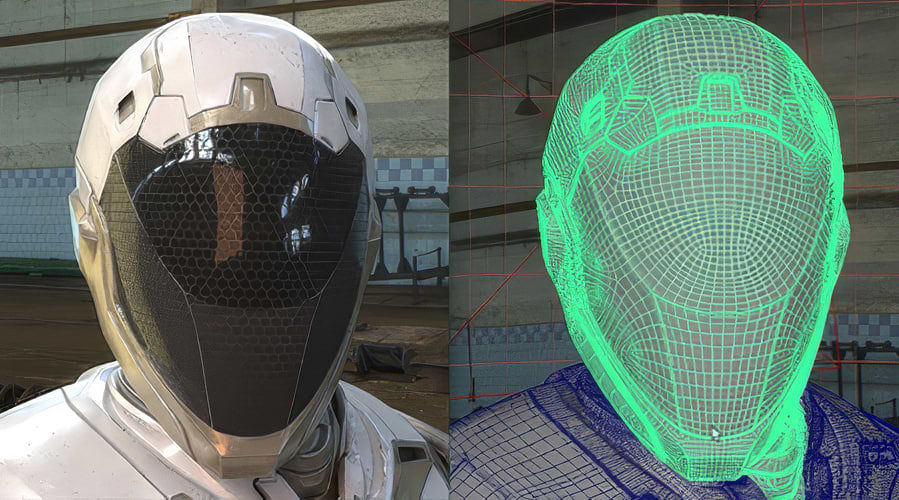
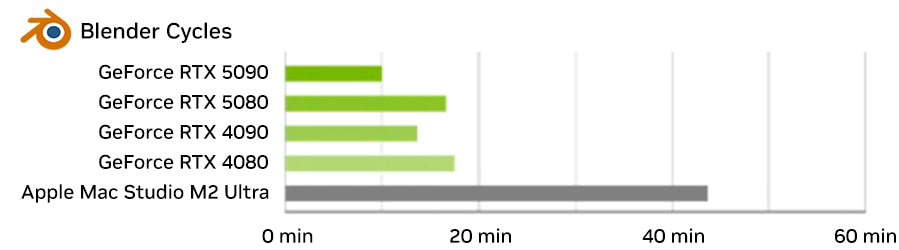
Model and render impressively detailed virtual worlds with the highest precision and blazing-fast performance powered by the RT Cores in NVIDIA RTX GPUs. Use AI denoising and NVIDIA DLSS to review your results faster, experience more realistic lighting, and create high-quality visualizations in less time.
Video Editing and Motion Design
Moving stories, created quickly
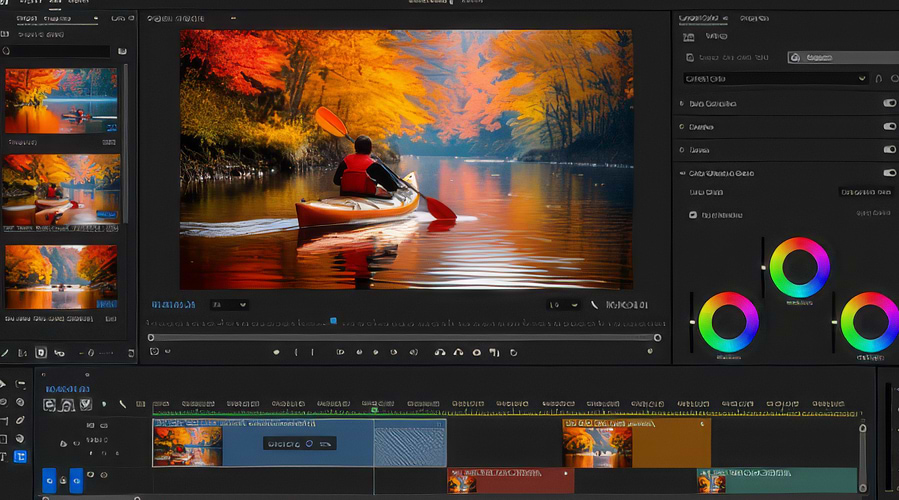
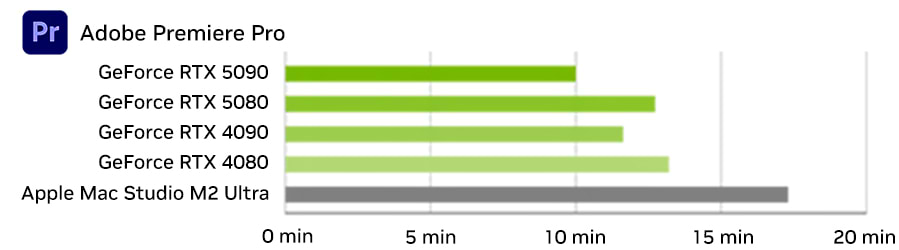
Now you can shoot, edit, and deliver in 4K, 8K, and 12K faster saving time and effort. Accelerate AI effects with Tensor Cores on RTX GPUs, edit 4:2:2 multi-camera footage with GPU optimization, and export videos significantly faster thanks to up to three encoders on RTX 5090 GPUs.
Up to 4.4x faster rendering (desktop)
Up to 73% faster video editing (desktop)
Shorter wait times are better. Performance tests were conducted by NVIDIA in December 2023 using desktop PCs with an Intel Core i9-12900K, UHD 770, and 32 GB of RAM. NVIDIA driver 521.28, Windows 11. For comparison purposes, the time was scaled to 10 minutes. Blender 4.3 uses the Blender OpenData benchmark with the OptiX render engine to measure the render time of various scenes.
Shorter wait times are better. The performance tests were conducted by NVIDIA in December 2023 using desktop PCs with an Intel Core i9-12900K, UHD 770, and 32 GB of RAM. NVIDIA driver 521.28, Windows 11. The Adobe Premiere Pro PugetBench GPU score measures various GPU-accelerated effects such as Lumetri Color, Gaussian Blur, Sharpen, and others.
3D animation
Performance makes a huge difference
Model and render detailed virtual worlds with blazing-fast performance thanks to the RT Cores in NVIDIA RTX GPUs, and review your results faster with AI denoising and NVIDIA DLSS.
Up to 4.4x faster rendering (desktop)
Shorter wait times are better. Performance tests were conducted by NVIDIA in December 2023 using desktop PCs with an Intel Core i9-12900K, UHD 770, and 32 GB of RAM. NVIDIA Driver 521.28, Windows 11. For comparison purposes, the time was scaled to 10 minutes. Blender 4.3 uses the Blender OpenData benchmark with the OptiX render engine to measure the render time of various scenes.
Video editing and motion design
Moving stories, created quickly
Now you can shoot, edit, and deliver in 4K, 8K, and even 12K faster. This saves you time and effort. Accelerate AI effects with Tensor Cores on RTX GPUs, edit 4:2:2 multi-camera content with GPU optimization, and export videos in a fraction of the time with up to three dedicated encoders on RTX 5090 GPUs.
Up to 73% faster video editing (desktop)
Shorter wait times are better. Performance tests were conducted by NVIDIA in December 2023 using desktop PCs with an Intel Core i9-12900K, UHD 770, and 32 GB of RAM. NVIDIA Driver 521.28, Windows 11. The Adobe Premiere Pro PugetBench GPU score measures various GPU-accelerated effects such as Lumetri Color, Gaussian Blur, Sharpen, and others.
Photography
Lightning-fast editing
Taking a picture is just the beginning. With more than 30 GPU-accelerated RTX effects, including AI features, you can easily retouch your high-resolution photos and enhance your artwork.
Graphic Design
Fast by design
Adobe Creative Cloud becomes lightning-fast with NVIDIA Studio, allowing you to design and refine your work faster than ever with powerful AI tools accelerated by GeForce RTX GPUs.
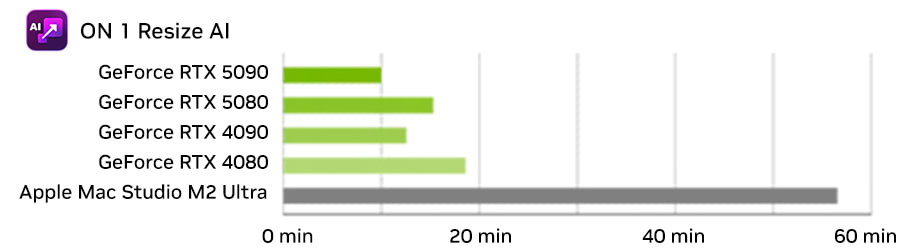
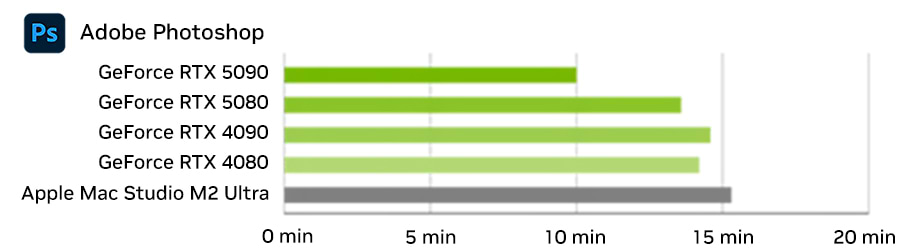
Up to 5.7× faster image scaling (desktop)
AI effects up to 53% faster (desktop)
Shorter wait times are better. Performance tests were conducted by NVIDIA in December 2023 using desktop PCs with Intel Core i9-12900K, UHD 770, and 32 GB of RAM. NVIDIA driver 521.28, Windows 11. For comparison purposes, the time was scaled to 10 minutes. ON1 Resize AI measures how long it takes to apply a super-resolution effect to a set of photos.
Shorter wait times are better. The performance tests were conducted by NVIDIA in December 2023 using desktop PCs with an Intel Core i9-12900K, UHD 770, and 32 GB of RAM. For comparison purposes, the time was scaled to 10 minutes. The performance measured using Adobe Photoshop indicates how long it takes to implement a sample AI feature, in this case super-resolution.
Photography
Lightning-fast editing
Taking a picture is just the beginning. With more than 30 GPU-accelerated RTX effects, including AI features, you can easily retouch your high-resolution photos and enhance your artwork.
Up to 5.7x faster image scaling (desktop)
Shorter wait times are better. Performance tests were conducted by NVIDIA in December 2023 using desktop PCs with Intel Core i9-12900K, UHD 770, and 32 GB of RAM. NVIDIA driver 521.28, Windows 11. For comparison purposes, the time was scaled to 10 minutes. ON1 Resize AI measures how long it takes to apply a super-resolution effect to a set of photos.
Graphic Design
Fast by design
Adobe Creative Cloud becomes lightning-fast with NVIDIA Studio, allowing you to design and refine your work faster than ever with powerful AI tools accelerated by GeForce RTX GPUs.
AI effects up to 53% faster (desktop)
Shorter wait times are better. Performance tests were conducted by NVIDIA in December 2023 using desktop PCs with an Intel Core i9-12900K, UHD 770, and 32 GB of RAM. For comparison purposes, the time was scaled to 10 minutes. Performance measured using Adobe Photoshop indicates how long it takes to implement a sample AI feature, in this case super-resolution.
Architectural Visualization
A performance boost for your spaces
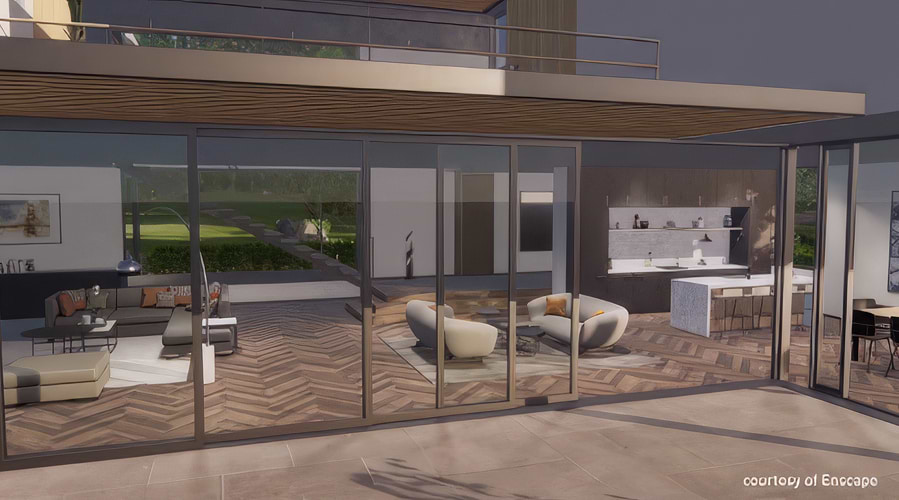
Effortlessly visualize worlds and spaces in breathtaking realism with RTX GPU-accelerated ray tracing and the NVIDIA OptiX™ Denoiser. And with NVIDIA DLSS, you get a perfectly smooth, responsive viewport in real-time renderers like Unity or Unreal Engine. This lets you navigate even complex scenes smoothly and make creative decisions faster.
Broadcasting
Next-generation livestreaming
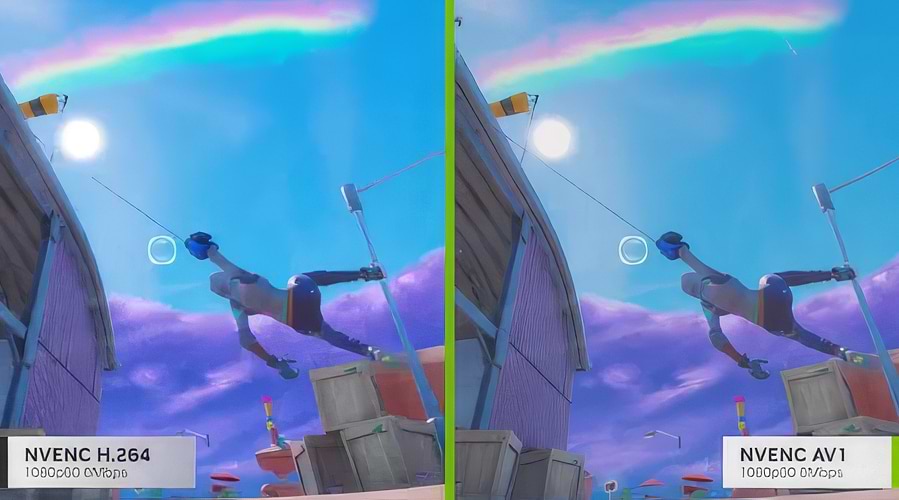
Boost the professional quality and performance of your favorite streaming apps with NVIDIA’s exclusive GPU encoder, NVENC, and turn any room into a home studio with AI-powered production effects like background noise suppression and eye contact in the NVIDIA Broadcast app.
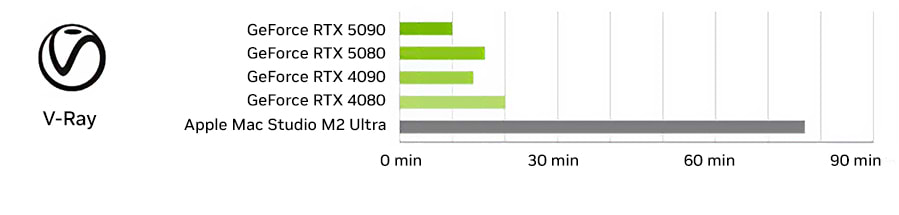
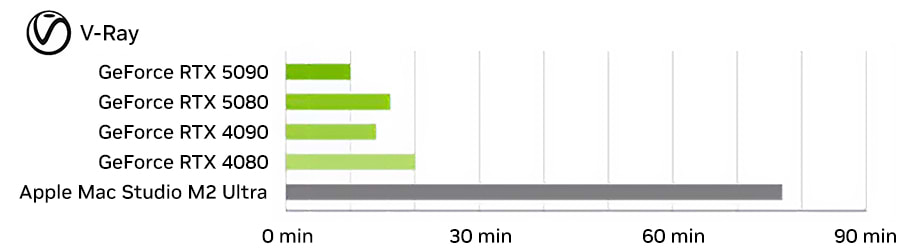
Up to 7.7x faster rendering (desktop)
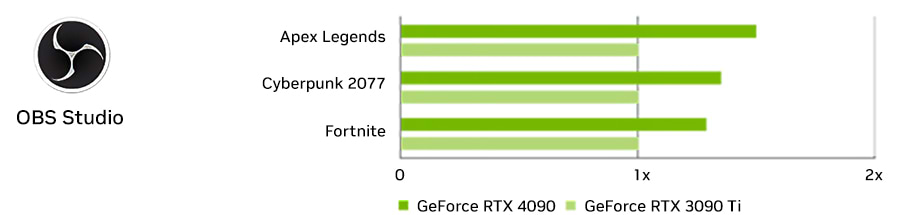
Up to 50% more FPS during livestreaming (desktop)
Shorter wait times are better. Performance tests were conducted by NVIDIA in December 2023 using desktop PCs with Intel Core i9-12900K, UHD 770, and 32 GB of RAM. NVIDIA Driver 521.28, Windows 11. For comparison purposes, the time was scaled to 10 minutes. The V-Ray 6 benchmark measures rendering performance across various scenes using the OptiX rendering engine.
The performance tests were conducted by NVIDIA in December 2023 using desktop PCs equipped with an Intel Core i9-12900K, UHD 770, and 32 GB of RAM. NVIDIA driver 521.28, Windows 11. Games were run at high 4K settings. OBS 30 recording of gameplay and webcam, encoded at 1080p/60 Hz and 6 Mbps.
Architectural Visualization
A performance boost for your spaces
Effortlessly visualize worlds and spaces with breathtaking realism using RTX GPU-accelerated ray tracing and NVIDIA OptiX™ Denoiser. And with NVIDIA DLSS, you get a perfectly smooth, responsive viewport in real-time renderers like Unity or Unreal Engine.
Up to 7.7x faster rendering (desktop)
Shorter wait times are better. Performance tests were conducted by NVIDIA in December 2023 using desktop PCs equipped with an Intel Core i9-12900K, UHD 770, and 32 GB of RAM. NVIDIA Driver 521.28, Windows 11. For comparison purposes, the time was scaled to 10 minutes. The V-Ray 6 benchmark measures rendering performance across various scenes using the OptiX rendering engine.
Broadcasting
Next-generation livestreaming
Boost the professional quality and performance of your favorite streaming apps with NVIDIA’s exclusive GPU encoder, NVENC, and turn any room into a home studio with AI-powered production effects like background noise suppression and eye contact in the NVIDIA Broadcast app.
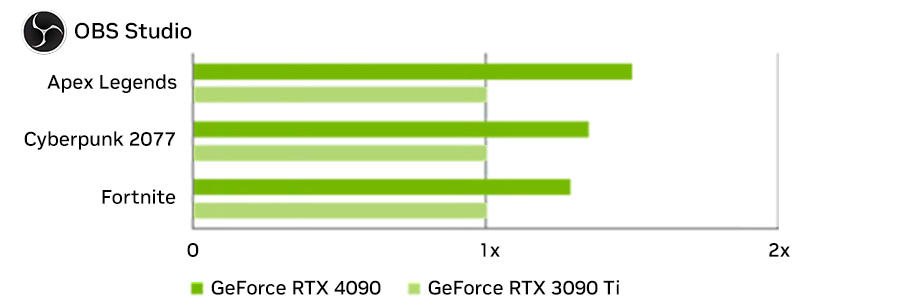
Up to 50% more FPS during livestreaming (desktop)
Performance tests were conducted by NVIDIA in December 2023 using desktop PCs equipped with an Intel Core i9-12900K, UHD 770, and 32 GB of RAM. NVIDIA Driver 521.28, Windows 11. Games were run at high 4K settings. OBS 30 recording of gameplay and webcam, encoded at 1080p/60 Hz and 6 Mbps.
Studio Apps and Software
EXCLUSIVE CREATIVE TOOLS
AI-enhanced video quality
RTX Video Super Resolution and RTX Video HDR automatically enhance videos played in Chrome, Firefox, or Edge. They use state-of-the-art AI algorithms to sharpen images and remove blocky and distracting compression artifacts. Enjoy crystal-clear videos in HDR at up to 4K.
Your AI-powered studio
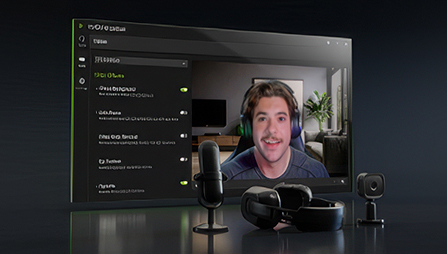
With the NVIDIA Broadcast app, any room becomes a home studio: Powerful AI transforms webcams, microphones, and speakers into high-quality smart devices. Experience your livestreams, voice chats, and video conferences in a whole new level of quality.
Remastering the Classics
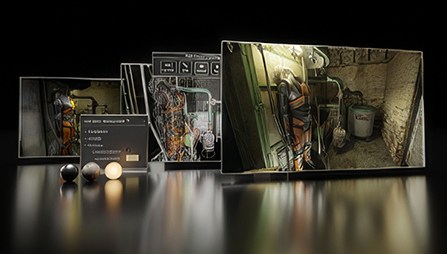
RTX Remix is built on Omniverse and allows modders to easily access game assets, automatically enhance materials using powerful AI tools, and quickly create stunning RTX remasters with full ray tracing and DLSS.
Studio Drivers
The invisible advantage
Unlimited creativity: NVIDIA Studio drivers power your creative apps and harness the full potential of your NVIDIA GPU for maximum performance, reliability, and speed, so you can bring your vision to life faster.
Studio Drivers
The invisible advantage
Unlimited creativity: NVIDIA Studio drivers power up your creative apps and harness the full potential of your NVIDIA GPU for maximum performance, reliability, and speed, so you can bring your vision to life faster.
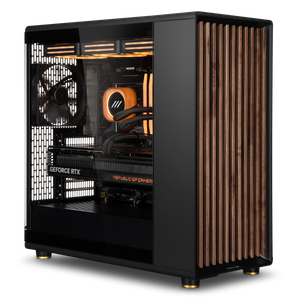
NVIDIA RTX Studio systems are optimized for one thing: stable, fast creative work. Instead of Game Ready drivers designed for gaming, they use NVIDIA’s Studio drivers, which are specifically developed for creative applications and validated for use with programs such as Adobe Premiere Pro, Photoshop, DaVinci Resolve, Blender, and Autodesk software. The result is fewer crashes during long sessions, reliable GPU acceleration in your tools, and color accuracy you can count on.
When RTX Studio Is the Right Choice
These systems are designed for content creators, photographers, video editors, and 3D artists who rely on GeForce RTX performance but want the stability of a professional driver stack. They bridge the gap between gaming systems and ISV-certified RTX professional workstations: full creative performance per euro, with a driver stack tailored to your software. You can find additional special products in our Workstation Technology Highlights.
Configure Your Custom RTX Studio Workstation
In the Workstation Configurator, you can customize your system to your specific needs. Business customers and public institutions also benefit from dedicated account managers, quotes for bids, purchase on account, or leasing. Contact ourB2B team directly—by phone, email, or live chat.