
FHD
Logitech - C925e
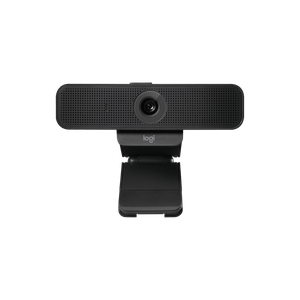
ID: 8460
54
,90
Delivery time:
1-3 business days

Discover our new Kick-Ass Systems
Webcams
54
,90
109
,90


1 - 2 of 2 Products
Logitech - C925e
54
,90
Delivery time:
1-3 business days
Logitech - Brio
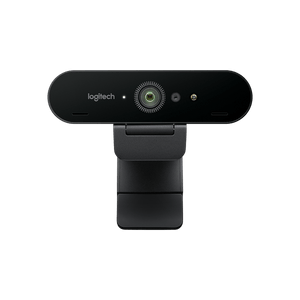
109
,90
9
,15
Delivery time:
1-3 business days
Webcams have long been more than just a stopgap for occasional video calls. In the age of remote work, streaming, and digital content, they are an essential tool for professional communication and presenting a professional image. Modern webcams offer high-resolution image quality, smart features, and excellent audio performance—all plug-and-play compatible with PCs or laptops. In this category, we’ve selected the best and most popular webcams for you. Each of these cameras has a resolution of at least Full HD at 30 FPS (frames per second). In addition, some models offer a wide range of features and additional functions, such as 3D spatial awareness and gesture control.
The most important decision when buying a webcam is likely the resolution. Full HD (1920×1080 pixels) is now standard and absolutely sufficient for most purposes—such as online meetings, training sessions, or classic livestreams. The image is clear and smooth and doesn’t place an excessive strain on system resources or bandwidth.
4K webcams (3840×2160 pixels), on the other hand, offer four times the level of detail. 4K is a real advantage, especially for professional livestreaming, video recording, content creation, or presentations with a lot of detail. Additionally, 4K sensors often allow for lossless digital zoom and better low-light performance. Important: A sufficiently fast internet connection and compatible software are also required for 4K streaming.
| Feature | Full HD (1080p) | UHD/4K (2160p) |
| Resolution | 1920 x 1080 pixels | 3840 x 2160 pixels |
| Image sharpness | High – sufficient for video calls and streaming | Very high - ideal for detail and professional photography |
| Applications | Home office, online meetings, casual streaming | Content creation, professional streaming, presentations |
| Price range | Generally more affordable | Higher-priced |
| Software compatibility | Universal | Software must support 4K (e.g., OBS, Teams) |
| Suitable for | Everyday use, work, training, simple streams | YouTubers, streamers, media professionals, detailed presentations |
Not every webcam is equally well-suited for every purpose. To help you quickly find the right camera, it’s worth taking a look at typical use cases:
 Home Office & Video Conferencing: A reliable Full HD camera with a good microphone is usually sufficient here. Look for features like autofocus and noise reduction.
Streaming & Content Creation: For Twitch, YouTube, or TikTok, you need high-quality video—ideally 4K at 60 FPS, manual settings, and a fast lens.
Online Classes & Training: Here, affordable models with stable performance are in demand. The camera should be plug-and-play and perform well in changing lighting conditions.
Business & Presentations: Look for compatibility with Microsoft Teams, Zoom, Google Meet, etc.; facial recognition or Windows Hello can be a plus here.
Mobile use: Small, lightweight webcams with a USB connection or clip mount are ideal for quick use on the go.
A good picture is of little use if the sound isn’t right. Especially if you don’t use an external microphone, you should also pay attention to sound quality when choosing a camera. Many high-quality webcams are equipped with dual microphones that enable noise cancellation and directional recording. This ensures clear voice transmission—whether you’re speaking during a call or providing live commentary.
However, if you’re aiming for maximum sound quality—e.g., as a streamer or podcaster—you should use a separate microphone or headset in addition to a good webcam.
When buying a webcam, you shouldn’t just look at the resolution. The following points are also crucial for optimal results:
1. Image sensor & light sensitivity
A high-quality sensor ensures a clear, noise-free image even in low light. This is a real advantage, especially in dark rooms or in natural light.
2. Autofocus & Auto Exposure
These features help keep you in focus and optimally exposed at all times—even when you move or lighting conditions change.
3. Microphone Quality
A built-in dual microphone with noise cancellation may be sufficient if you’re not using a separate microphone. Make sure the voice transmission is clear, without echo or background noise.
4. Mounting & Flexibility
Many webcams can be mounted on monitors, laptops, or tripods. Models with a swivel head or tripod mount are particularly flexible.
A major advantage of external webcams is their flexibility. Many can be clipped onto monitors or laptops, mounted on a tripod, or placed freely in the room. When purchasing, make sure the camera fits your setup—for example, via a tripod mount or clamp attachment.
Optional accessories like ring lights, microphone arms, or USB hubs can further enhance your setup and ensure better presentation—especially for streaming or recording setups.
At MIFCOM, you’ll find only webcams from renowned manufacturers known for their high build quality, reliability, and well-designed features. These include brands such as Logitech and Elgato.
These brands have proven themselves over many years in both personal and professional settings. Our product selection is based on clear criteria: image and sound quality, user-friendliness, feature set, compatibility, and a good price-performance ratio are our top priorities. We pay particular attention to models that meet current requirements for home offices, streaming, or content creation—such as 4K resolution, noise reduction, autofocus, or plug-and-play connectivity.
Thanks to this careful pre-selection, at MIFCOM you won’t find a confusing overabundance of options, but rather carefully selected webcams that excel in their price range and intended use—whether you’re a beginner, a business user, or a professional streamer.
All webcams offered by MIFCOM are compatible with common operating systems such as Windows, macOS, and, in some cases, Linux. Connection is typically via USB-A or USB-C and usually works immediately without additional drivers.
For professional needs, additional accessories are often worth the investment. These are the most popular add-ons:
Ring light or LED panels: Provides even, soft lighting—especially on the face.
USB microphone or headset: Significantly improves sound quality compared to built-in microphones.
Webcam tripod or arm: Ideal for positioning at eye level or for special angles.
USB hubs: Especially handy for laptops with few ports, allowing you to connect the camera and accessories at the same time.
- Focusing only on resolution: A 4K webcam with a poor sensor often delivers worse results than a good Full HD camera.
- Forgetting the microphone: Especially during long video calls, sound is almost more important than the image.
- Wrong connection type: Not every webcam has USB-C – check if it’s compatible with your device.
- Not enough light in the room / poor lighting: Even the best webcam won’t produce a good image in poorly lit rooms. An additional light source helps significantly here.
Whether for occasional video calls, daily use in your home office, or professional livestreams—at MIFCOM, you’ll find the right webcam for your needs. From compact Full HD models to high-quality 4K cameras with advanced features, we offer only certified brand-name quality that integrates reliably into any setup.
If you want to take your communication to the next level—invest in a high-quality webcam. This not only results in better picture and sound quality but also leaves a professional impression on your customers, colleagues, or viewers.