

3.499
27.399


Rendering Workstations for demanding projects
PRO-LEVEL
FAST RENDERING
Render workstations for OctaneRender & Redshift –
designed for demanding production workflows.

Shorter rendering times
Optimized & customizable
Maximum detail
Rendering workstations
1 - 5 of 5 Products

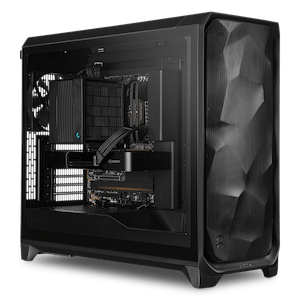
Hardware requirements for a rendering PC:
Are you looking for the perfect workstation for rendering tasks? Then our workstations, specially optimized for OTOY OctaneRender and Redshift, are exactly what you need. We’ve analyzed benchmarks and studies from the most reputable hardware magazines and, based on that, offer you the best rendering PCs for your specific needs:
Which processor is best suited for OTOY OctaneRender and Redshift?
The performance of GPU-based rendering is only partially influenced by the system’s processor. A CPU with high clock speeds can reduce scene load times, but it does not increase rendering speed.
If CPU-intensive rendering tasks are also to be performed on the render workstation, hybrid systems with multiple cores and high clock speeds are recommended.
In addition to clock speeds and the number of cores, the number of supported PCI Express lanes must also be considered depending on the processor. This determines the maximum number of graphics cards that can be installed in a system.
The AMD Ryzen 9 9900X (12 cores, up to 5.6GHz turbo clock) and Ryzen 9 9950X (16 cores, up to 5.7GHz turbo clock) are particularly well-suited as CPUs with the highest single-core performance for all Octane Render / Redshift tasks. However, due to the CPUs’ 24 PCI-E lanes, they support a maximum of two graphics cards.
If you plan to install more graphics cards, you’ll need a CPU that supports a sufficient number of PCIe lanes. The Intel Xeon W5-2555X (14 cores, up to 4.8 GHz turbo boost) is a suitable option here, allowing you to run up to four graphics cards without any issues. Alternatively, you can opt for processors from the AMD Threadripper series.
Which graphics card should you choose for a render PC running OTOY OctaneRender and Redshift?
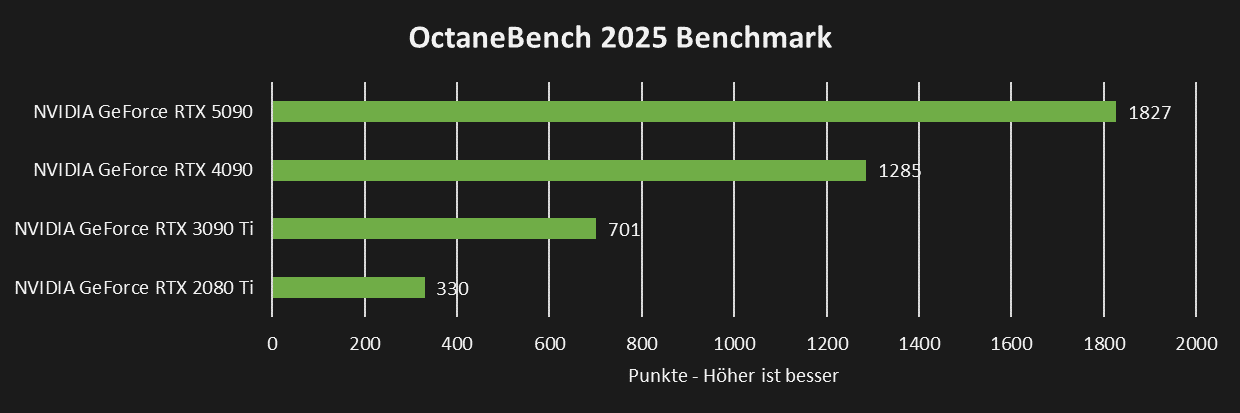
The performance of OctaneRender and Redshift is determined by two key aspects of the graphics card: the clock speed and the size of the video memory.
The NVIDIA RTX 5080 with 16GB VRAM is a good starting point for a rendering PC. If more performance or video memory is needed for rendering complex scenes, using multiple NVIDIA RTX 5090s with 32GB VRAM makes sense.
 |
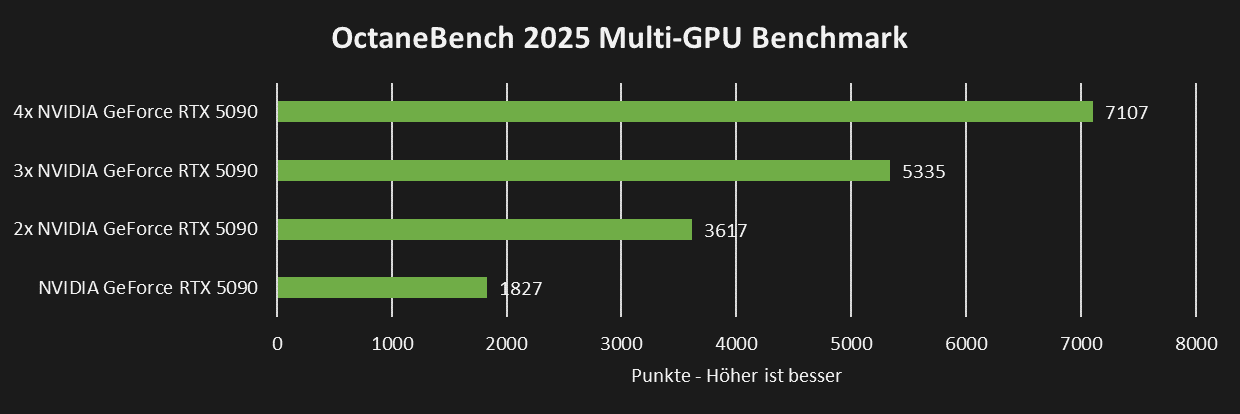
Does it make sense to use multiple graphics cards for OTOY OctaneRender and Redshift?
OTOY OctaneRender and Redshift scale very well with multiple graphics cards, making the use of up to four graphics cards per system a sensible choice. For optimal results, we recommend only blower models designed for multi-GPU operation. These can be stacked on top of each other, providing excellent rendering performance with optimal cooling.
 |
How much RAM is required for an OTOY OctaneRender and Redshift rendering workstation?
For OctaneRender and Redshift, we recommend installing at least 32GB of RAM, which should be sufficient for all standard rendering tasks. If you plan to run additional programs simultaneously, it may be advisable to upgrade to 64–128GB of RAM.
Do I need an SSD for OTOY OctaneRender and Redshift?
To ensure fast load times, an SSD should be used for both the operating system and the rendering programs. The fast system drive can be supplemented with either a large HDD or an additional SSD for data storage. An additional SSD can boost the performance of the rendering PC, as it allows projects to be loaded and saved more quickly.
Our recommendations:
Octane Render / Redshift | |||
| Processor | Graphics Card | RAM | |
| Single GPU rendering | AMD Ryzen 7 9700X Intel Core Ultra 5 245K | NVIDIA RTX 5090 | 32GB |
| Dual GPU Rendering | Intel Xeon W5-2555X | 2x NVIDIA RTX PRO 6000 | 64GB |
| Quad GPU rendering | Intel Xeon W7-2575X AMD Ryzen TR PRO 7965WX | 4x NVIDIA RTX PRO 6000 | 128GB |